Portfolio Overview Dashboard
One HTML file you can open offline · sample data included · works in any browser. portfolio-dashboard.zip · ~340 KB
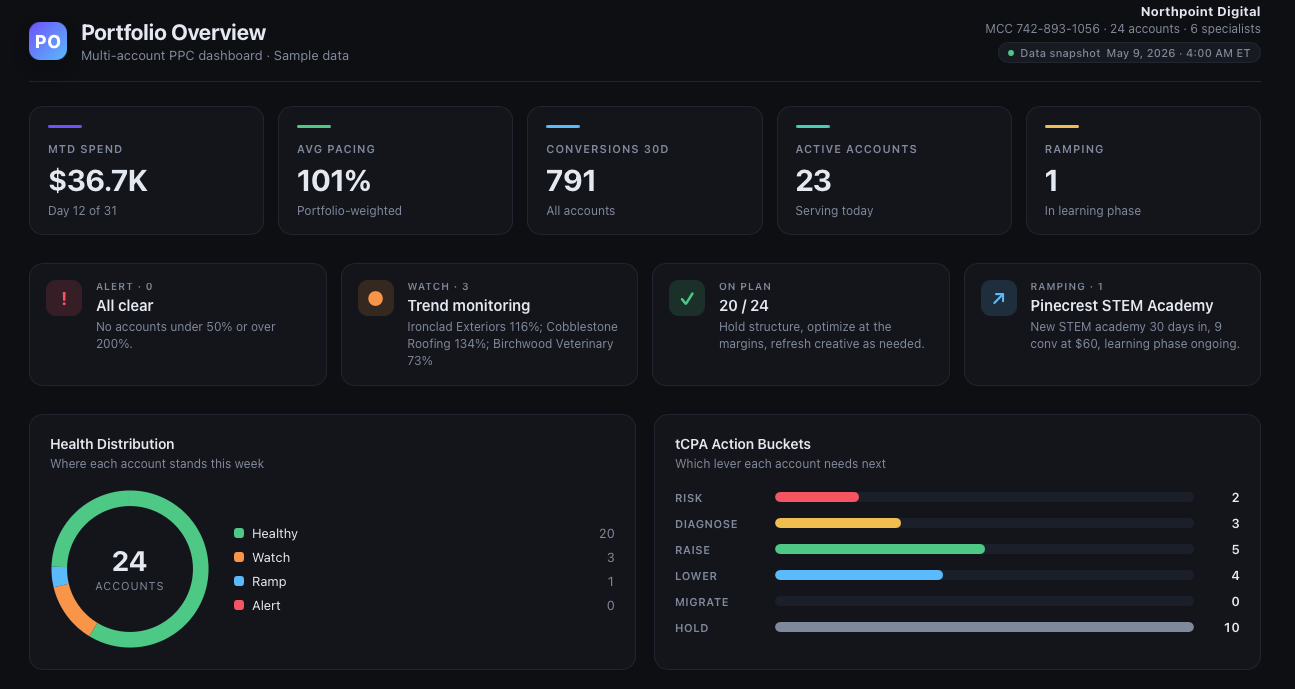
If you manage more than three PPC accounts, you've felt this: Monday morning, fourteen browser tabs, three spreadsheets, two Google Docs, and a creeping sense that something important is hiding in plain sight. We built this dashboard for ourselves — and we're publishing it so you can have it too.
The problem this solves
Portfolio-level visibility is the hardest part of running a multi-account PPC agency. The data is everywhere, the tools are expensive, and by the time you've finished your Monday reporting ritual, it's already Tuesday afternoon.
The big BI tools (Power BI, Looker Studio, Tableau) solve a real problem — but they bring their own. Data warehouse setup. Recurring licenses. A connector that breaks every time Google Ads updates a schema. And once it's all wired up, somebody on the team has to maintain it.
What we wanted, for our own team, was the simplest possible thing that worked: one HTML file, opens in any browser, shows the whole book at a glance, rebuilds in 30 seconds when fresh data comes in. No SaaS, no logins, no SOC2 ceremony.
So we built it. It's free. Here's what's in the download.
What you get
The sample data uses a fictional agency, Northpoint Digital, with 24 accounts across roofing, home services, vet clinics, schools, and SaaS. No real client information is included — open it, ship screenshots, build a pitch deck, hand it to a junior on the team for training. Whatever you need.
Quick start (60 seconds)
1. Try the demo
Download the zip, unzip it, double-click Portfolio-Overview-Dashboard.html. Your browser opens the full dashboard with sample data. Nothing to install, no internet required after the first download.
2. Rebuild with your own data
Want to see your accounts in the same layout?
Open Claude desktop in Cowork mode
The version with file access. If you've never used Cowork, our Resources page walks through the setup.
Drop two files in a new chat
Portfolio-Overview-Dashboard.html (so Claude knows the visual template) and your Google Ads CSV export from the last 30–90 days.
Paste the prompt from CLAUDE-PROMPT.md
The whole prompt is in the download. Copy it, paste it into the chat, send. Claude will ask one or two clarifying questions (monthly budget per account, target CPA per vertical, today's date).
Open your new dashboard
About 30 seconds later, Claude saves Portfolio-Overview-yourname-YYYY-MM-DD.html to your folder. Double-click it. Done.
Why a separate Claude prompt and not a SaaS? Because the prompt is yours to fork. Change the layout, swap the color, add a panel for Microsoft Ads — Claude rewrites the HTML in place. No vendor on the critical path.
Three ways to use it
Static demo
Open the HTML, browse the data, decide if the layout fits how you think about your portfolio. Use it as a mockup to share with the team or a prospective client.
Recommended first runRefreshed weekly with Claude
Every Monday, drop your fresh CSV into the same Claude chat and say "refresh". Claude remembers your previous answers and regenerates the HTML in seconds.
Recommended for real useConnected live
Install a Google Ads MCP or Supermetrics connector inside Cowork. Change the prompt from "the attached CSV" to "my Google Ads, last 30 days" — Claude pulls fresh data on every run.
For the curiousWhat the dashboard surfaces
The layout is opinionated. We've stripped out the noise that doesn't change decisions and kept only what does:
| Section | The question it answers |
|---|---|
| KPI row | How much have we spent? Are we pacing on plan? How many conversions across the whole book? |
| State cards | Which accounts are at risk, which need watching, which are ramping, which are healthy? |
| Health donut | One-glance distribution of all accounts by state |
| tCPA buckets | Which lever each account needs next: RISK · DIAGNOSE · RAISE · LOWER · MIGRATE · HOLD |
| Daily Briefcase | Top movers since yesterday · hidden risks · opportunities worth scaling |
| Weekly actions | The 4-6 things that actually matter this week, by account name |
| Account table | Filterable view of all accounts: budget, MTD spend, pacing, CPA, health, tCPA action |
If you've used Looker Studio or Power BI for client reporting, this is the same layer of insight — but without the data warehouse, the licensing, or the maintenance.
The "but, but, but" objections
"My CSV columns are different."
Claude reads the headers and maps them automatically. If a column is genuinely missing — say, you don't track conversions on some accounts — the matching section is hidden gracefully instead of showing zeros.
"My accounts are in CAD / EUR / BRL / GBP."
Detected per-account from the CSV. The dashboard shows the right currency symbol next to each row. Multi-currency portfolios render correctly.
"Will my data leave my machine?"
No. The HTML runs entirely in your browser. The Claude rebuild happens in your local Cowork session. Nothing is uploaded to any third party by this tool.
"Can I re-skin it for a white-label client?"
Yes. The CSS lives in a <style> block at the top. Change the --accent and --accent-2 variables and you're done. Or ask Claude: "Use #FF6A00 as the accent."
"Can I add a section for Meta Ads / Microsoft Ads?"
Yes. "Add a panel showing spend by channel — Search / Shopping / PMax / Meta." Claude edits the HTML in place.
"I'm not technical. Will I actually get this to work?"
The static demo: double-click the HTML. That's the whole process. The rebuild: copy a prompt into Claude. If you can send a Gmail attachment, you can do this.
Why we're giving this away
We sell actcenter, the operating system this kind of dashboard plugs into. Daily Briefcase generation, talking points per account, the tCPA Health framework with the 14-day cool-off baked in, a real product that connects to your MCC.
But you don't need any of that to get value from this dashboard. So we packaged it up and made it free. If you decide later that you want the briefcase generated for you every morning at 8am instead of running a prompt every Monday — come back to actcenter. If you never do — keep the dashboard, use it weekly, fork the prompt.
Either way, your Monday morning gets shorter.